
AI Automation for Business: 7 Workflows Worth Testing
Explore seven business automation workflows, how to rank them, where human review matters and how to measure a focused AI pilot.
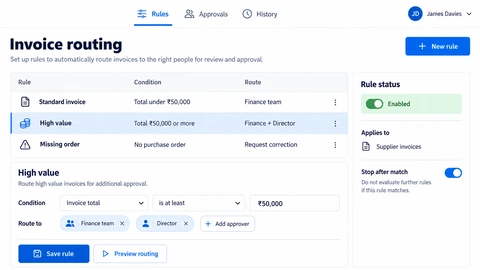
AI automation for business means using AI models inside a defined workflow so that software handles the routine reading, sorting and drafting, while people handle the decisions. It is most useful on tasks that repeat often, follow a recognisable pattern and can be checked quickly.
It is least useful when sold as a replacement for judgement. This guide gives seven workflows that usually make good first projects, a table to rank them for your own business, and a list of work that should wait. Each workflow is described the same way: what goes in, what the AI does, what a person still checks, and how to measure it.
What makes a task worth automating with AI?
A task is worth automating when it repeats often, has a clear owner, produces an output someone can check in seconds, and has examples you can test against. If you cannot describe the input, the expected output and what counts as a mistake, the task is not ready for AI yet.
Four questions help. How often does it happen? What does a wrong result cost? Do you have past examples to test with? How many other systems must it connect to? A weekly task with expensive errors and no examples is a poor first project. A daily task with cheap errors and a shared inbox full of examples is a good one. Write down the current time per task before you start, because that is your baseline for every claim later.
Which seven workflows should you automate first?
These seven appear in most small and mid-sized businesses in some form. They are listed roughly from lowest risk to highest. In every case the AI prepares and a person approves, at least until you have evidence that the output is reliable enough to relax that rule.
1. Enquiry triage and routing
- Goes in: emails, web form messages or chat enquiries.
- AI does: labels the type (sales, support, billing, spam), extracts key details such as company, product and urgency, and routes it to the right queue.
- Person checks: low-confidence items and a regular sample of routed ones.
- Measure: time from arrival to the right person seeing it, and the share of enquiries rerouted by hand.
This is often the best first project because mistakes are visible and cheap to fix. A misrouted enquiry is slower, not catastrophic. Our business automation service typically starts here.
2. Drafting replies for human approval
- Goes in: a customer message plus your policies, past replies and product information.
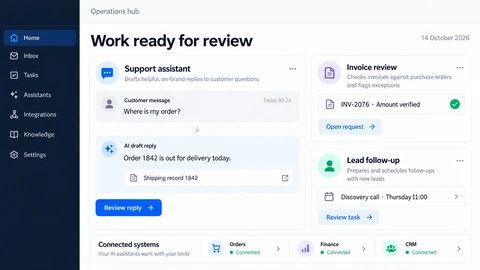
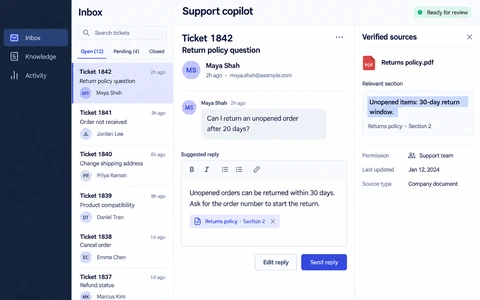
- AI does: writes a draft reply in your tone and cites which policy or past answer it used.
- Person checks: every draft before it is sent, editing as needed.
- Measure: drafts accepted with no or light edits, minutes saved per reply, and complaints about tone or accuracy.
Nothing is sent without approval, so the risk stays low while you learn how often the drafts are good. Edits are also useful data: patterns in what people change show you where the instructions or source documents need work.
3. Document and invoice data extraction
- Goes in: invoices, purchase orders, forms, contracts or delivery notes, often as PDFs or photos.
- AI does: pulls out named fields such as supplier, date, line items and totals into a structured record.
- Person checks: fields that fail validation, such as totals that do not add up, and a sample of the rest.
- Measure: field-level accuracy against a hand-checked set, and time per document.
Accuracy here can be measured field by field, which makes it one of the more honest workflows to evaluate. Add simple rules around the AI, for example rejecting a record where line items do not sum to the total.
4. Meeting and call note summaries into the CRM
- Goes in: a call recording transcript or meeting notes, with permission from participants.
- AI does: summarises decisions, lists action items with owners, and proposes updates to CRM fields.
- Person checks: the summary and any CRM change before it is saved.
- Measure: minutes spent on admin after calls, and how many CRM records are complete a day later.
The value is mostly consistency: notes get written and records get updated. Make sure you have consent to record and transcribe, and decide where transcripts are stored and for how long. A custom CRM can make the proposed updates easier to review.
5. Internal knowledge search
- Goes in: handbooks, policies, product sheets, past proposals and help articles.
- AI does: answers staff questions in plain language and shows the source passages it used.
- Person checks: the cited source when the answer matters, and owners review gaps the assistant reports.
- Measure: questions answered without asking a colleague, share of answers with a correct source, and searches that end in no result.
This is the workflow behind most AI assistants. It only works as well as your documents, so budget time to clean them. Explore how a business AI assistant can use your own information with appropriate access controls.
6. Lead qualification and follow-up prep
- Goes in: new leads from forms, ads or events, plus your definition of a good fit.
- AI does: summarises the company from public information, scores fit against your criteria, and drafts a first follow-up for the salesperson.
- Person checks: the score and the draft before anyone is contacted.
- Measure: time from lead to first contact, and whether high-scored leads convert better than low-scored ones.
Track the last measure honestly. If scores do not predict outcomes, change the criteria rather than trust the number. See our sales and marketing automation work for how routing and follow-up preparation fit together.
7. Report and dashboard commentary
- Goes in: figures from your reports or business dashboards, plus last period for comparison.
- AI does: drafts a short written commentary on what changed and which numbers look unusual.
- Person checks: every figure quoted and every explanation offered, since the AI sees the numbers but not the reasons.
- Measure: time to produce the weekly report, and corrections made before it is shared.
Keep the calculations in code or your reporting tool, not in the model. Let the AI describe numbers that are already computed, then have an analyst confirm the explanations.
How do you rank the seven for your business?
Score each candidate on four things: how often it happens, how costly a mistake is, whether you have example data, and how easy it is to connect. The table below shows a typical starting view. Treat the ratings as a prompt for discussion, because your business will differ.
| Workflow | Frequency | Cost of error | Data availability | Ease |
|---|---|---|---|---|
| Enquiry triage and routing | High | Low | High (inbox history) | Medium |
| Draft replies for approval | High | Low (approved first) | High (sent mail) | Medium |
| Document and invoice extraction | Medium to high | Medium | Medium | Medium |
| Meeting and call notes to CRM | Medium | Low to medium | Medium | Medium |
| Internal knowledge search | Medium | Low to medium | Depends on document quality | Medium |
| Lead qualification and follow-up prep | Medium | Medium | Medium | Medium to hard |
| Report and dashboard commentary | Low to medium (weekly) | Medium | High (the numbers exist) | Easy to medium |
Pick the row where frequency is high, error cost is low and data exists. For many teams that is enquiry triage or drafted replies. If your biggest pain is somewhere else, such as invoices, start there, but add stricter validation because the cost of an error is higher.
What should you not automate yet?
Leave a task alone when the process is unclear, a wrong answer is costly or irreversible, or you have no examples to test against. Automating a messy process produces a faster mess. These tasks are better left with people, or automated only up to a drafting step.
- Processes nobody can describe. Write the steps down first. If two people do it differently, agree one way before adding AI.
- Final decisions on money, contracts, hiring, health or legal matters. AI can prepare material, but a named person decides.
- Anything that sends messages or changes records with no review, until you have measured error rates on real examples.
- Tasks with no sample data. Without 30 to 50 real, representative cases you cannot tell whether the workflow works.
- Sensitive personal or confidential data you have not classified. Decide what may leave your systems before choosing tools.
- Rare, high-variety work such as one-off negotiations, where each case is different and the saving is small.
How do you run a first pilot?
Run one workflow, on real examples, with a person approving the output, and compare it with your baseline. A small pilot answers whether the workflow works for your data far more cheaply than a large build, and it shows where the real work is: usually in documents, permissions and integrations, not the model.
- Choose one workflow and write down its current time per task and error rate.
- Collect 30 to 50 real examples, including awkward ones, and agree what a good output looks like.
- Build the smallest version that connects to the real inbox, CRM or document store, with approval before anything is sent or saved.
- Run it alongside the current process for a set period and log accepted, edited and rejected outputs.
- Review the numbers, fix the biggest failure pattern, then decide whether to widen, change or stop.
Plan for the unglamorous parts too: logging, access rights, a clear handoff when the AI is unsure, and someone who owns the workflow after launch. Demos show the idea; production needs these. If you are unsure whether you need a simple assistant, a workflow or something more autonomous, explore our AI and automation services first.
Worked example: an enquiry-routing pilot
Consider a hypothetical team that manually reads inbound project enquiries. A bounded pilot could validate required fields, suggest a service category and prepare a short handoff for staff approval. Straightforward routing rules should remain deterministic; AI is useful only where interpreting free text adds value.
Collect a representative sample including duplicate messages, vague requests and unrelated enquiries. Compare suggestions with a named reviewer’s decisions. Record review time, incorrect assignments, edits and failed integrations. Define success before looking at the results; no particular time saving is assumed.
- Start without automatically sending customer replies.
- Keep the original enquiry available so a reviewer can inspect the source.
- Test missing information and provider timeouts, not only complete requests.
- Make retries safe so one enquiry does not create several CRM records.
Different tasks need different scope: business automation handles routing and exceptions, AI assistants retrieve approved knowledge, and sales automation connects inbound lead context and reviewed follow-up. Use API integration services when data movement is the main requirement.
What to do next
Pick the workflow with the highest frequency, lowest cost of error and best example data, and measure how long it takes today. That one number is the start of a useful conversation about scope. You do not need a model chosen or a vendor shortlisted to do this.
If you would like help ranking your own candidates or scoping a pilot, tell us which task is eating the most time through our contact page. We work in milestones with regular demos and agree what success looks like before building. Cost and timing depend on scope, so we talk them through with you rather than quote a number here.
See the workflow in our project work
Explore the screens and decisions behind related user journeys. Each case study explains its project context; the service choice for your own project follows your requirements.
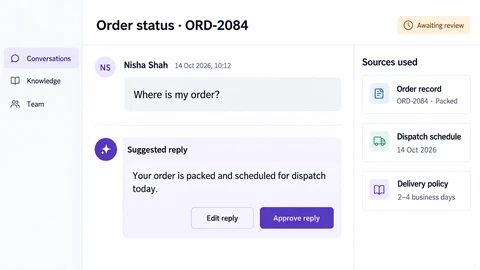
AI Customer Support Workspace: Nexa
Original conversation beside the draft · Visible source-record context · Explicit reply editing and approval.
Read the project case study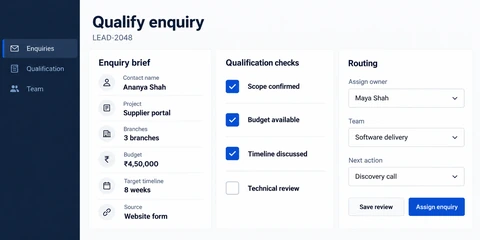
Lead Qualification & Routing: Intake
Structured project enquiry context · Separate qualification checks · Owner, team and next-action routing.
Read the project case studyExplore business workflow automation to scope a reviewed pilot.