
Shopify vs WooCommerce vs Custom Ecommerce: How to Choose
Compare Shopify, WooCommerce and custom ecommerce by catalogue complexity, integrations, operating costs and the team running your store.

Shopify vs WooCommerce comes down to who runs the store and how unusual your way of selling is. Shopify is a hosted platform that looks after the infrastructure for you. WooCommerce is a plugin for WordPress that you host and maintain yourself. A custom store is worth building only when a standard platform cannot support a journey that earns you money.
The best choice is rarely the platform with the longest feature list. It is the one your team can run on an ordinary Tuesday without calling a developer, and that will still fit the business in two years. This guide gives you the criteria, a comparison table and a short process for deciding.
What is the real difference between Shopify, WooCommerce and a custom store?
The real difference is who carries responsibility. With Shopify, a vendor hosts the platform, runs the checkout infrastructure and ships core updates, and you configure the store, choose a theme and add apps. With WooCommerce, you or your agency choose hosting, update WordPress, the plugin and every extension, and take care of security and backups. With a custom store, you own all of it.
That gives you a simple way to think about it. Shopify trades some flexibility for convenience. WooCommerce trades convenience for control over the code, the database and the content. Custom trades speed and low upkeep for the freedom to model your business exactly. None of the three is better in general. Each is better for a particular kind of team.
How large and complex is your catalogue?
Catalogue complexity matters more than catalogue size. A few thousand simple products with sizes and colours suit all three options. Trouble starts with unusual structures: made-to-order products with many dependent options, bundles with rules, B2B price lists per customer, rental or booking items, or products that need a configurator before they can be priced.
Ask three questions. Can every product be described as a title, images, variants and a price? Do prices or availability depend on who is buying? Does a buyer need to configure the product before adding it to the basket? If the answers are yes, no and no, a hosted platform is usually the quickest route. If the second or third answer is yes, list exactly which rules you need and check whether a maintained app or plugin covers them before you consider custom work.
Who will run the store every day?
The person who edits products, processes orders and runs promotions should shape the decision. A marketing or operations lead who wants to launch a collection or a discount without developer help usually does well on Shopify, because the admin is built for merchants. A team that already publishes content on WordPress may find WooCommerce natural, because products, posts and landing pages live in one system.
Custom admin tools can be excellent when they are designed around your exact workflow, but they only help if someone owns their evolution. Be honest about capacity. If nobody on the team can look after plugin updates, backups and hosting, a self-hosted store will slowly become a risk. If you want deep control and have a developer or agency on retainer, that same setup becomes an asset.
What about integrations, ERP and checkout customisation?
Integrations decide more projects than design does. Write down every system the store must exchange data with: inventory or ERP, accounting, shipping, a CRM, a marketing tool, a returns process. For each one, note what moves in which direction and how often. Stock levels and orders are the usual pain points, because errors there cost money and customer trust.
Shopify extends through apps and APIs, and its documentation describes checkout customisation through checkout UI extensions and Shopify Functions, which let you add interface elements and change business logic such as discounts, delivery options and payment rules. WooCommerce is extended with PHP hooks, filters, plugins and its REST API, so almost anything is possible but quality varies by plugin. A custom store lets you design the integration properly, at the price of building and maintaining it.
If you run an ERP, ask early whether a maintained connector exists for your platform and who supports it when it breaks. Our integration solutions work often starts exactly here, with a clear data map between the store and the systems behind it.
What does total cost of ownership include?
Total cost of ownership is everything you pay to build, run and change the store over its life, not the build quote. Prices and plans change often, so check each vendor’s current pricing page rather than relying on an article. What you should do is list the cost categories so the three options are compared like for like.
- Platform or hosting: a subscription for a hosted platform, or hosting, a CDN and backups for a self-hosted one.
- Theme and design work, including future changes to templates.
- Apps or plugins, which often carry their own recurring fees, and the effort of keeping them compatible.
- Payment provider and transaction fees, which depend on your provider, region and plan.
- Developer time for integrations, bug fixes, updates and security patching.
- Staff time: how many hours a week your team spends working around limitations.
- Migration and exit costs if you outgrow the choice.
Custom builds have the highest upfront cost and often the lowest per-feature friction later, but they also have the largest maintenance obligation. Hosted platforms look cheaper at the start and can accumulate app fees. Self-hosted WooCommerce can look cheapest on paper and then quietly cost developer hours. Model three years, not three months.
How do performance, hosting and SEO control compare?
Hosting responsibility is the clearest performance difference. On Shopify the platform handles servers and delivery, so your speed depends mostly on your theme, images and apps. On WooCommerce, speed also depends on your host, caching, database and plugin load, which gives you more control and more ways to go wrong. On a custom store, performance is whatever you engineer.
For search, all three can rank well when built properly. WooCommerce sits on WordPress and offers fine control over URLs, templates and content. Shopify gives you editable titles, descriptions, redirects and sitemaps, though some URL patterns such as the products and collections prefixes are fixed. Custom stores give full control but require you to build SEO basics deliberately. Whichever route you take, plan for performance and search foundations, clean product data and structured markup from the start.
Shopify vs WooCommerce vs custom: side-by-side comparison
Use this table to score each option against your own priorities. It describes general tendencies, not guarantees, so confirm the details for your own requirements before you decide. Give each row a weight from one to three based on how much it matters to your business, then see which column wins.
| Criterion | Shopify | WooCommerce | Custom store |
|---|---|---|---|
| Hosting model | Hosted and managed by the vendor | Self-hosted on WordPress; you choose and manage hosting | You choose and manage everything |
| Best for catalogue | Standard products and variants | Content-rich or moderately unusual catalogues | Complex configurators, rules and pricing |
| Day-to-day admin | Merchant-friendly, built for non-developers | Familiar if you already use WordPress; more upkeep | Whatever is built; needs an owner |
| Checkout customisation | Through extensions and Shopify Functions | Hooks, filters and plugins; wide but uneven quality | Fully designed to your rules |
| Integrations and ERP | Apps and APIs; check connector support | Plugins and REST API; check maintenance | Built to your exact data flows |
| Cost shape over time | Subscription plus apps and fees | Hosting, plugins and developer time | Highest upfront, ongoing engineering |
| Performance responsibility | Platform infrastructure; you manage theme and apps | Shared: host, caching, plugins | Entirely yours |
| SEO control | Good, with some fixed URL patterns | Very high with WordPress tooling | Total, but built from scratch |
| Migration risk later | Moderate; data export and redirects needed | Moderate; you own the data and database | Higher; custom data models are harder to move |
When does headless or custom make sense, and what is the migration risk?
Custom or headless commerce makes sense when a specific journey earns real revenue and a standard platform cannot support it. Headless means the shopping interface is built separately from the commerce engine and talks to it through an API. It can give you a faster, fully tailored front end, but it also means you maintain two layers, and many conveniences of a themed store become your responsibility.
Good reasons include a product configurator, unusual B2B pricing, a subscription model with special rules, or an experience that spans content, community and commerce. Weak reasons include wanting a unique look alone, or assuming custom is automatically faster. Our custom ecommerce team tends to suggest proving the hardest journey with a small prototype first.
Replatforming itself is risky whichever way you go. Products, customers, order history, reviews and URLs all have to move, and any URL that changes without a redirect can lose search visibility. Keep the old store running until the new one is verified, redirect every important URL, and agree a rollback path. Our search and visibility service includes a review of redirects, indexing and monitoring needs.

Worked example: the requirement that decides the platform
Imagine a merchant with ordinary products, a small editorial team and standard shipping. Its first comparison should establish whether a maintained Shopify or WooCommerce setup meets the workflow. A custom storefront is not automatically better because the design is distinctive.
Now change one requirement: every order needs customer-specific pricing and approval by the buyer’s purchasing manager. Prototype that rule with the candidate platform before committing. Compare extension support, operating fees and failure handling with a custom workflow. These are hypothetical examples, not client outcomes.
- Can the required product be configured without a fragile collection of workarounds?
- Who reconciles stock and orders when a provider is unavailable?
- Which account owns the store, payment integration and source assets?
- Can the team test the hardest order before the full catalogue is migrated?
Use the relevant scope guide to prepare the next conversation: Shopify development, WooCommerce development or custom ecommerce development. For synchronisation around an existing store, review ecommerce operations workflows.
Checkout extension surfaces and plan eligibility can change. Verify the exact requirement using Shopify’s checkout development documentation, rather than assuming any requested checkout change is available on every plan.
What to do next
Take an hour and do three things. List your ten most important products and any rules attached to them. List every system the store must connect to. Name the person who will run the store daily. With those three lists, most teams can already rule out one option.
Then test the hardest journey, not the easiest. If you are leaning towards a hosted platform, our Shopify development work focuses on theme, catalogue and checkout. If WordPress is already part of your stack, see WooCommerce development. If neither fits, bring your list to a conversation and we will help you judge it honestly. You can contact us whenever you are ready.
See the workflow in our project work
Explore the screens and decisions behind related user journeys. Each case study explains its project context; the service choice for your own project follows your requirements.

Skincare Ecommerce: Dew
Skin-preference filtering · Ingredient, texture and use-time comparison · Product-level add-to-bag actions.
Read the project case study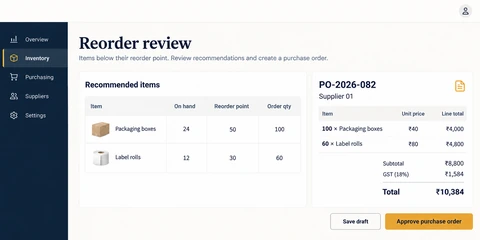
Inventory Management Software: Stockroom
Reorder thresholds and recommendations · Purchase-order line-item review · Separate draft and approval actions.
Read the project case studyCompare our ecommerce development services when you are ready to scope a store.