
Less manual work
Connect your tools and reduce repetitive tasks.
Connect existing software through supported APIs and event workflows, with clear ownership of records and a plan for failures, retries and reconciliation.
Discuss your project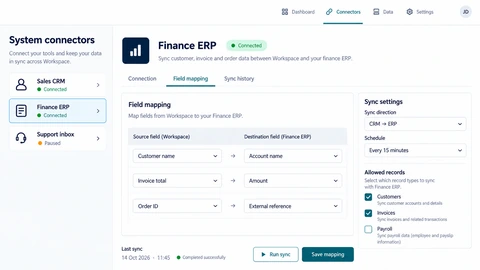
Connect your tools and reduce repetitive tasks.
Keep information in sync across your systems.
Give your team the right information in one place.
An integration is not complete when one test record arrives. Define which system owns each field, how updates are identified and what should happen when a provider is unavailable. These decisions prevent loops, duplicates and silent data drift.
Connect with the tools you rely on using secure, reliable integrations.
Keep your data consistent across multiple systems.
Link your CRM with other tools to streamline your processes.
Bring your cloud tools together for a smoother, more connected workflow.
For example, synchronising approved CRM records into an operations system requires field mapping, change rules and reconciliation. AI is optional; most transfer rules should remain deterministic.
Review documentation, authentication, rate limits and supported operations. Use sample records to map required fields and unsupported cases.
Plan stable identifiers, validation, idempotent writes and credential handling. Handle deletions and conflicting updates explicitly.
Compare source and destination records, expose failed work and document how staff can recover without creating duplicates.
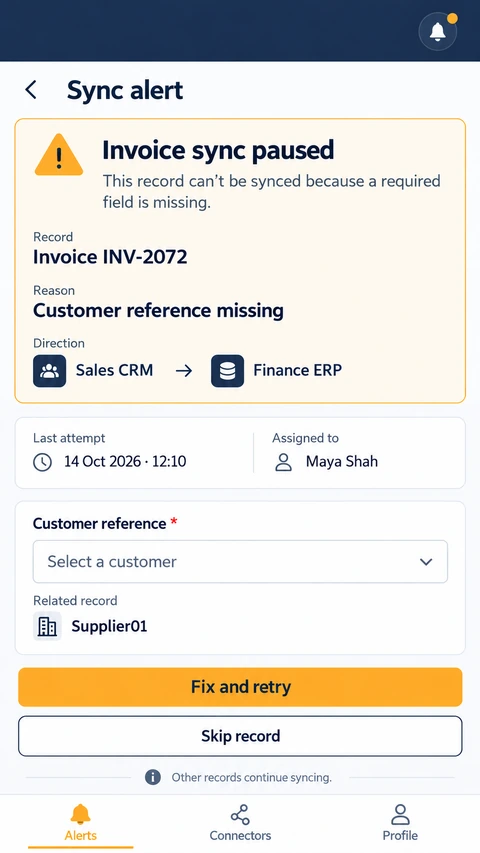
Explore the interface, then open any image at its original resolution.
Straightforward answers to common questions about integration solutions.
No. Access permissions, provider contracts, licensing and supported interfaces determine feasibility. Assess these before promising synchronisation.
Only where ownership and conflict rules justify it. One-way transfer is often easier to reason about and operate.
Agree stable identifiers and idempotent writes, then test retries and delayed events. Reconciliation is still needed to detect provider or data-quality issues.
Agree the important success and failure paths before development. These proposed checks help turn the service description into a reviewable delivery brief.
Explore the screens and decisions behind related user journeys. Each case study explains its project context; the service choice for your own project follows your requirements.
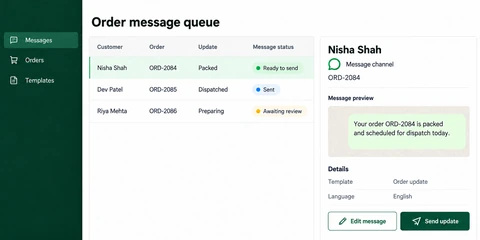
Order-referenced message queue · Template and language context · Message preview, editing and sending states.
Read the project case study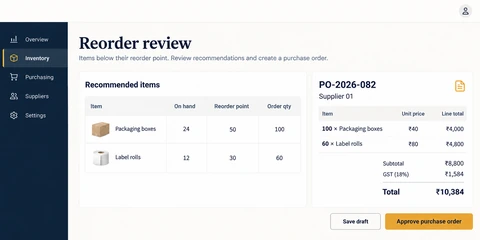
Reorder thresholds and recommendations · Purchase-order line-item review · Separate draft and approval actions.
Read the project case studyTalk to our team about how integration solutions can support your goals.