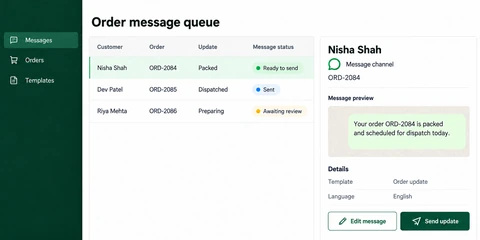
Distinguish confirmed and pending events
Show timestamps, sources and the difference between a plan and a recorded movement.
Design shipment tracking, dispatch and customer-portal tools around reliable status events, understandable exceptions and clear operational ownership.
Discuss your project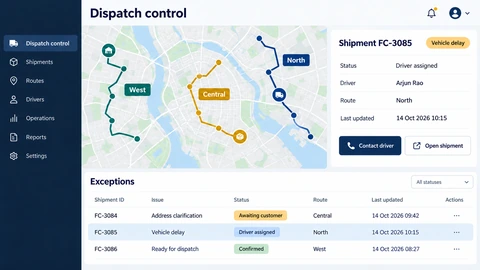
Show timestamps, sources and the difference between a plan and a recorded movement.
Bring constraints and unresolved tasks into the planning view.
Expose appropriate shipment information without sharing unrelated operational records.
A shipment screen should explain what is known, when it was last updated and what needs attention. Tracking data can come from carriers, staff or other providers with different update schedules; do not imply live location when only a milestone is available.
Present agreed milestones and exception states with clear data freshness.
Scope allocation, route information and review steps around the dispatcher’s actual process.
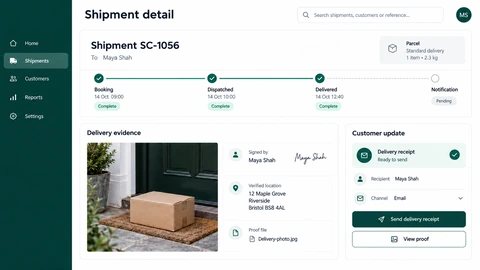
Provide authenticated shipment lookup, documents and enquiry context.
Map provider status codes and failed updates into a consistent internal event model.
Include creation, allocation, collection, delivery attempts and returns. Record which party confirms each event.
Review missing scans, delayed events, duplicate messages and conflicting status information.
Validate the dashboard and customer view with a small workflow before extending to additional carriers or locations.
Only where the source supports the required location or event frequency. The interface should display freshness and limitations accurately.
Permissions and data fields should be deliberately separated. Customer-facing tracking does not require exposing the full operations record.
Agree an internal status model and mapping for each provider, including unknown statuses and reconciliation behaviour.
Explore the screens and decisions behind related user journeys. Each case study explains its project context; the service choice for your own project follows your requirements.
Bring the current process, connected systems and the decision you want to improve. We can assess a practical first phase.