
Custom Web
Application Development
Build a browser-based tool for bookings, approvals, customer accounts or internal operations, with the permissions and business rules the workflow requires.
Discuss your project
Web applications scope
A web application is useful when visitors need to do something beyond reading pages. The important decisions are the state of each record, who can change it and what happens when an action fails or is repeated.
Workflow and data model
Define records, statuses, validations and the rules connecting customers, staff and administrators.
Accessible application screens
Plan forms, account states, search, notifications and recovery paths for keyboard and mobile users.
Services and integrations
Scope APIs, authentication, background work and external connections with explicit failure handling.
Planning web applications
- 1
Trace the task end to end
Identify inputs, approvals and outputs. Walk through cancellations, duplicate submissions and incomplete information before choosing a framework.
- 2
Deliver a working vertical slice
Connect one complete screen-to-database journey, including permissions and error states, before adding secondary features.
- 3
Verify the release workflow
Exercise realistic user roles, integration failures and data recovery. Hand over deployment notes and an agreed maintenance plan.
See the details.
Across every screen.
Explore the interface, then open any image at its original resolution.
Desktop experience
1 / 1Web applications
Scope, tradeoffs and preparation for your project.
When is a web app better than a mobile app?
A web app suits workflows reached through links and used across many devices. Device features, offline requirements and distribution may justify a mobile app instead.
Can you extend an existing application?
We first assess the code, dependencies, data model and release process. The findings determine whether a focused extension or a larger refactor is practical.
What determines the project scope?
User roles, business rules, connected systems and exceptions usually matter more than the number of screens. Bring a complete example of the task.
How we would validate this scope
Agree the important success and failure paths before development. These proposed checks help turn the service description into a reviewable delivery brief.
- The server rejects a forbidden operation even when a client sends a manually crafted request.
- A repeated transaction request cannot create an unintended second business record.
- Interrupted sessions and invalid inputs provide a recoverable application state.
- A release rehearsal covers the database migration and the associated recovery procedure.
See the workflow in our project work
Explore the screens and decisions behind related user journeys. Each case study explains its project context; the service choice for your own project follows your requirements.
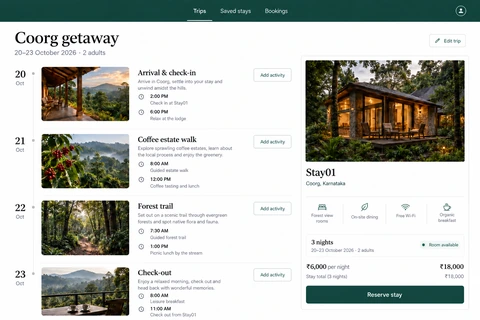
Travel Booking Website: Roam
Timed itinerary entries · Stay amenities and availability context · Trip editing, saved stays and booking navigation.
Read the project case study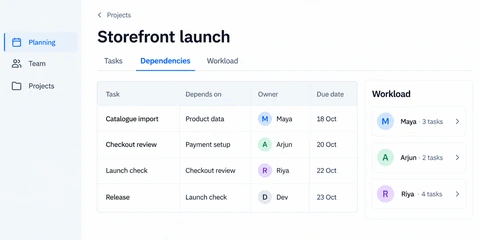
Project Planning Dashboard: Orbit
Task dependency relationships · Owner and deadline columns · Team workload summary.
Read the project case studyDiscuss your web applications project.
Share your requirements so we can agree a focused scope, dependencies and the next useful step.