
Smoother everyday work
Reduce manual effort and handovers across your processes.
Connect repeated tasks across forms, inboxes and business systems, with explicit routing rules, recovery steps and human approval where the action matters.
Discuss your project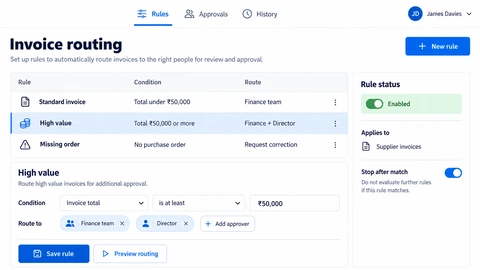
Reduce manual effort and handovers across your processes.
Give your people time for higher-value work.
Keep information moving and people informed at the right time.
Use deterministic rules for decisions that are already clear. Add AI only where interpreting unstructured text or documents provides value and its errors can be checked. A first workflow should have a named owner, representative inputs and an observable outcome.
A practical pilot might turn an approved request into a task and a status update. Test incomplete inputs, duplicates and unavailable providers before letting it change more systems.
Record the trigger, required fields, decision owner and output. Include the manual path staff use when an input is incomplete or unusual.
Implement validation, deduplication and approval before consequential actions. Check provider limits and permissions for every connected tool.
Compare handling time, error patterns and escalation frequency with the baseline. Give staff a way to inspect and retry failed work without repeating successful actions.
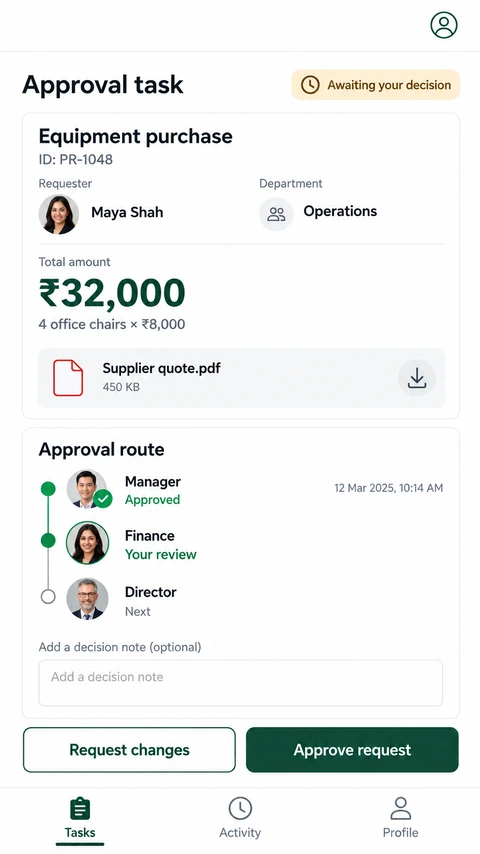
Explore the interface, then open any image at its original resolution.
Straightforward answers to common questions about business automation.
No. Defined rules are usually easier to test for deterministic tasks. AI may help classify or extract information when uncertainty is acceptable and reviewed.
Agree timeouts, retries, duplicate prevention and an actionable failure queue. A workflow needs a recovery path as well as a successful path.
Choose a frequent task with stable inputs, accessible systems and mistakes that are inexpensive to detect. Avoid beginning with irreversible financial or account actions.
Agree the important success and failure paths before development. These proposed checks help turn the service description into a reviewable delivery brief.
Explore the screens and decisions behind related user journeys. Each case study explains its project context; the service choice for your own project follows your requirements.
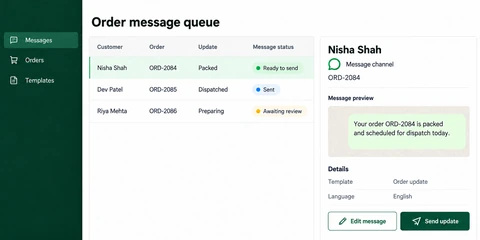
Order-referenced message queue · Template and language context · Message preview, editing and sending states.
Read the project case study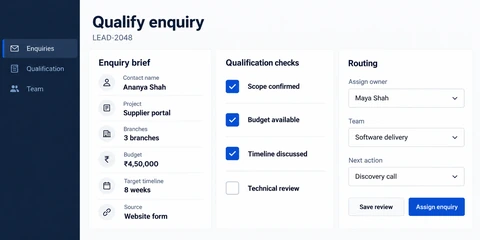
Structured project enquiry context · Separate qualification checks · Owner, team and next-action routing.
Read the project case studyTalk to our team about how business automation can support your goals.