
User Interface
Design Services
Design clear product screens and reusable components so people can recognise actions, understand status and recover from mistakes.
Discuss your project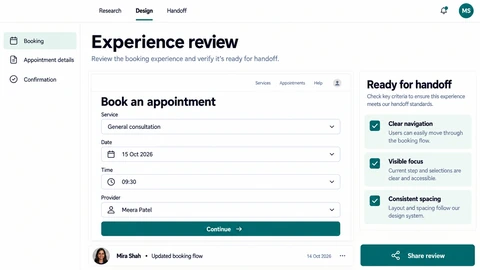
Interface design scope
A useful interface system covers more than the ideal screen. Loading, validation, empty results, long content and restricted access all need deliberate presentation and clear language.
Screen and state design
Work through forms, lists, detail screens and the states required by the chosen customer journey.
Reusable components
Define buttons, inputs, typography and spacing with consistent behaviours and accessible interaction notes.
Developer handover
Provide assets, responsive rules and annotations that connect designs to actual application data.
Planning interface design
- 1
Inventory screens and constraints
Review brand foundations, user flows and the components already available in the codebase.
- 2
Design representative states
Prototype the most demanding screen and its smaller-screen layout before expanding the system.
- 3
Review implementation details
Resolve keyboard focus, text overflow, validation and component variants with the engineers building the interface.
See the details.
Across every screen.
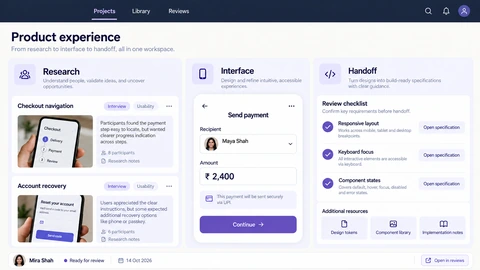
Explore the interface, then open any image at its original resolution.
Desktop experience
1 / 1Interface design
Scope, tradeoffs and preparation for your project.
Can you use our existing design system?
Yes. Review its components and gaps first, then extend it where the product needs an additional state or pattern.
Does interface design include a brand identity?
Not automatically. Product styling can follow your current identity; new brand strategy, logos or identity guidelines need their own scope.
How is accessibility handled?
Design review can cover contrast, hierarchy, labels, focus and error communication. Implementation and assistive-technology testing are also needed.
How we would validate this scope
Agree the important success and failure paths before development. These proposed checks help turn the service description into a reviewable delivery brief.
- Reusable components cover loading, empty, error, restricted and successful states.
- Keyboard focus, text labels and error communication are specified alongside visual appearance.
- Long content and narrower viewports retain the task’s information hierarchy.
- Implementation review resolves differences between the design model and real application data.
See the workflow in our project work
Explore the screens and decisions behind related user journeys. Each case study explains its project context; the service choice for your own project follows your requirements.
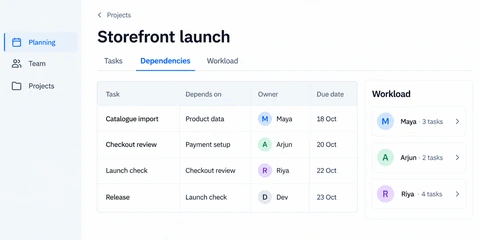
Project Planning Dashboard: Orbit
Task dependency relationships · Owner and deadline columns · Team workload summary.
Read the project case study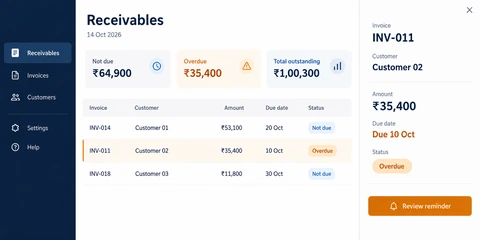
Invoice Management Software: Ledger
Outstanding and overdue summaries · Invoice list with date and status · Selected invoice detail and reminder review.
Read the project case studyDiscuss your interface design project.
Share your requirements so we can agree a focused scope, dependencies and the next useful step.