
Evidence before preference
Use user tasks, support questions and observed behaviour to identify friction.
Make complex products easier to understand through user research, clearer journeys and consistent interfaces that developers can implement.
Discuss your project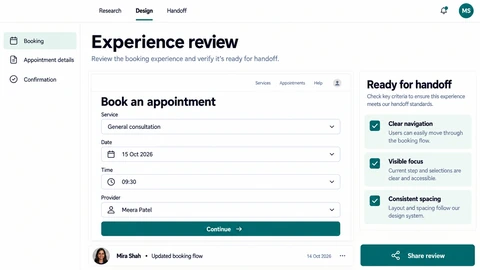
Use user tasks, support questions and observed behaviour to identify friction.
Design errors, empty results and smaller screens alongside the ideal view.
Connect reusable components, responsive rules and annotations with implementation needs.
Design work can begin with a new idea or a specific problem in an existing product. UX establishes the task and structure; UI defines screens and interaction states; visual identity gives those touchpoints a coherent expression. Scope each discipline around the decision it needs to support.
Agree the audience, priority task and available evidence rather than starting with decorative references alone.
Use realistic content and task-based feedback to test structure and interaction choices.
Package the agreed screens, components, assets and behaviour notes for engineering.
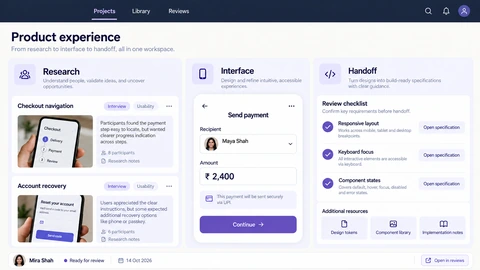
Explore the interface, then open any image at its original resolution.
One connected team. Clear decisions.
Your involvement at every important step.
We listen to your goals, users and constraints, and agree what success looks like.
Together, we define the scope, choose the right tools and set clear milestones.
We design, develop and integrate your solution, with working progress to review.
We test the experience, gather your feedback and prepare a thoughtful handover.
Scope, tradeoffs and preparation for your project.
Yes. Product journeys and interface consistency can improve while preserving the existing visual identity.
No. Design can specify useful contrast, labels and interaction guidance; implementation and user testing must verify the resulting experience.
Map each role’s decision, permitted information and handoff to the next person. Prototype approvals, conflicts, restricted states and exception recovery alongside the successful path, then review those states with both users and engineering.
Explore the screens and decisions behind related user journeys. Each case study explains its project context; the service choice for your own project follows your requirements.
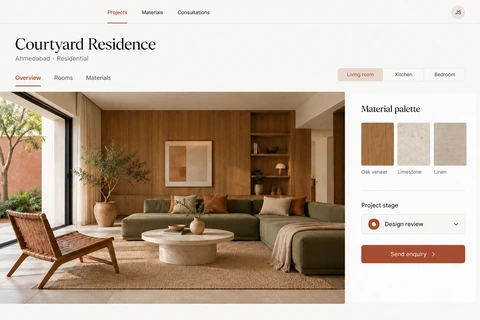
Project and room navigation · Material palettes beside photography · Project-stage context and consultation enquiries.
Read the project case study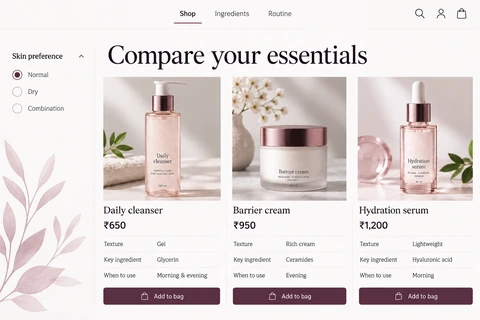
Skin-preference filtering · Ingredient, texture and use-time comparison · Product-level add-to-bag actions.
Read the project case studyShare your requirements so we can agree a focused scope, dependencies and the next useful step.