
iOS & Android
App Development
Plan mobile applications around the actions people need on their phones, with deliberate choices about device features, permissions and app-store distribution.
Discuss your project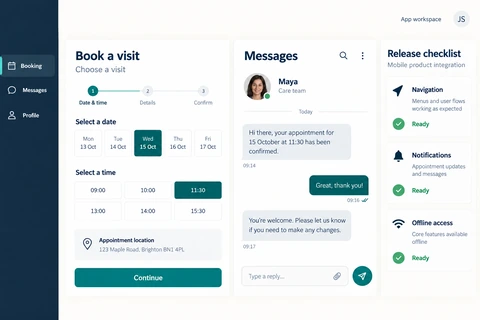
iOS & Android apps scope
The platform decision depends on the experience: camera use, background activity, offline work and device integrations can change the implementation. Define those requirements before comparing native and shared-code approaches.
Mobile task design
Scope navigation, input, notifications and accessible touch interactions for the primary on-the-go journey.
Device and service connections
Assess camera, location, authentication, backend APIs and the permissions each feature needs.
Release preparation
Plan signing accounts, store materials, privacy disclosures, supported OS versions and update ownership.
Planning iOS & Android apps
- 1
Validate the mobile use case
List the devices, connectivity conditions and tasks users will encounter. Identify what must work without a network.
- 2
Prototype the difficult interaction
Test the device feature or service dependency with the highest uncertainty before building every screen.
- 3
Prepare a staged release
Check permissions, upgrades and account recovery on the agreed devices. Allow for store review and follow-up fixes.
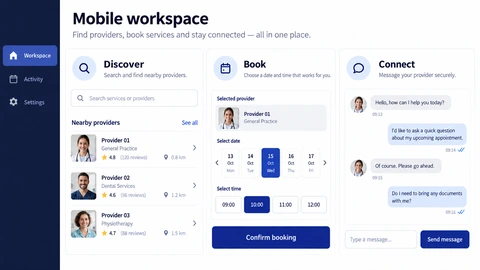
See the details.
Across every screen.
Explore the interface, then open any image at its original resolution.
Mobile experience
1 / 1iOS & Android apps
Scope, tradeoffs and preparation for your project.
Do we need separate iOS and Android builds?
That depends on device requirements and the existing team. Native and cross-platform approaches have different tradeoffs; neither is best for every project.
Who owns the app-store accounts?
Ownership and access should be agreed before release. Client-controlled accounts help keep distribution and future updates with the business.
Can you guarantee app-store approval?
No. Review decisions belong to the stores. Submission preparation, policy checks and a response plan reduce avoidable rework.
How we would validate this scope
Agree the important success and failure paths before development. These proposed checks help turn the service description into a reviewable delivery brief.
- Permission denial leaves a meaningful alternative or explanation for the affected task.
- An interrupted application session resumes without silently repeating a purchase or booking.
- The agreed device and operating-system matrix covers the important native integrations.
- A signed release build can be reproduced using client-controlled account access.
See the workflow in our project work
Explore the screens and decisions behind related user journeys. Each case study explains its project context; the service choice for your own project follows your requirements.
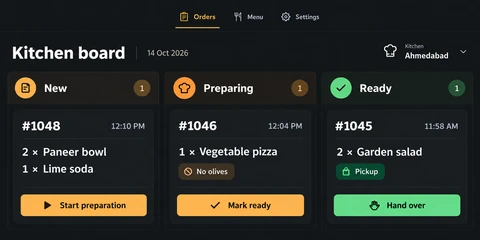
Food Ordering & Kitchen Workflow: Basil
New, Preparing and Ready order stages · Item quantities and preparation instructions · Stage-specific kitchen actions.
Read the project case study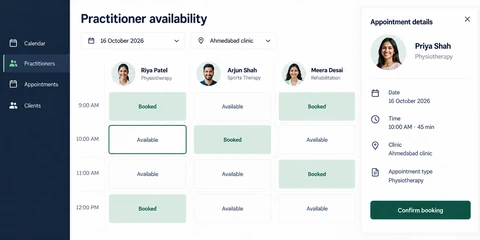
Appointment Booking App: Haven
Practitioner availability grid · Date and clinic selection · Appointment review before confirmation.
Read the project case studyDiscuss your iOS & Android apps project.
Share your requirements so we can agree a focused scope, dependencies and the next useful step.