
A status-led kitchen board
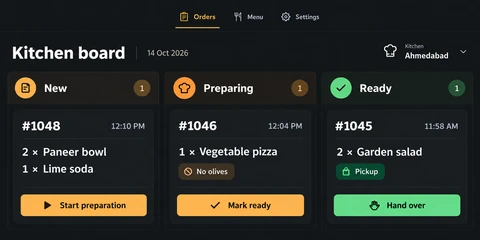
The desktop board groups orders into New, Preparing and Ready columns. Order references and times give each card an identity, while quantities and item names let staff read the work without opening a separate detail view.
A food-ordering project connecting the customer’s mobile journey with a kitchen board organised around preparation and handover.
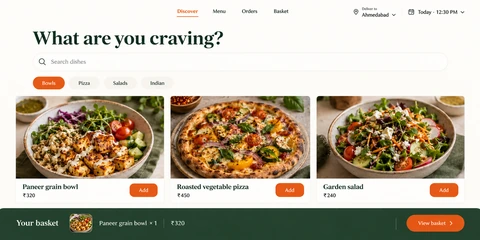
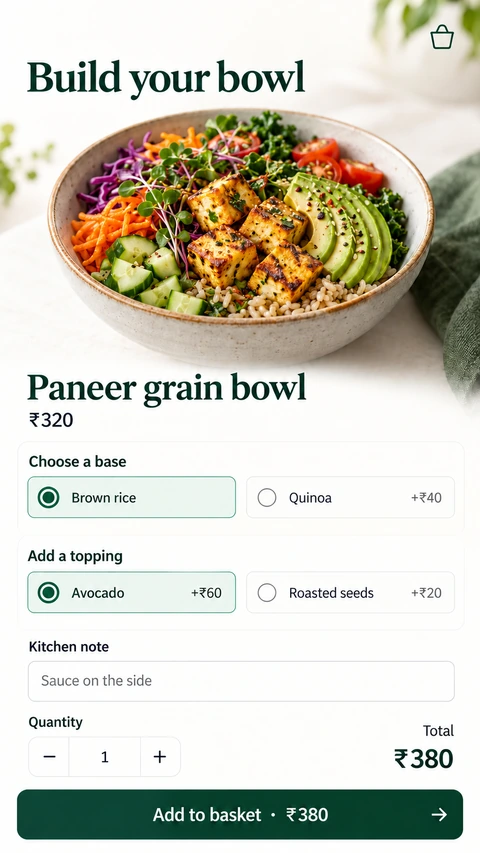
The project includes both sides of an order: the customer selecting food and staff moving that order through preparation. The kitchen screen makes the operational stages explicit, while the mobile screens represent the customer-facing part of the same product.
The desktop board groups orders into New, Preparing and Ready columns. Order references and times give each card an identity, while quantities and item names let staff read the work without opening a separate detail view.
A special instruction appears directly on its order item, and collection context is visible on the ready card. This puts the information that changes preparation or handover beside the action it affects.
Start preparation, Mark ready and Hand over communicate distinct transitions. The board uses both text and visual grouping to explain the next step. The companion mobile screens connect the product to the ordering experience customers use.
A customer app often depends on an equally clear staff workflow. Model the operational stages alongside the shopping or ordering screens so the product covers the complete task.
Explore the relevant development service for this project workflow to discuss your requirements.
A proposed engineering design for this workflow. The enterprise scenario and stack below are illustrative architecture choices; they are separate from the confirmed project screens.
A restaurant group operates customer ordering, several kitchens and collection points with different preparation capacity and intermittent device connectivity.
Architecture objective: Give customer orders and kitchen actions one authoritative lifecycle while allowing each kitchen board to recover after a connection loss.
Flutter for mobile; React and TypeScript for kitchen boards
Keep touch-friendly ordering separate from the staff view of preparation and handover.
NestJS with a modular order domain
Validate menu options, location eligibility and order transitions on the server.
MongoDB with multi-document transactions and an append-only order-event collection
Commit the order state and its outgoing event together through an outbox.
RabbitMQ and WebSocket gateways
Deliver durable preparation work through the queue and use sockets to refresh connected boards.
Redis for ephemeral presence; Grafana and Sentry for monitoring
Observe reconnects and queue age without treating connection state as proof that an order was accepted.
A socket message can be missed. Resume the board from an authoritative snapshot and event cursor, then handle duplicate events safely.
Two staff members can act on the same order. Validate the expected version and permitted state transition before accepting the command.
A cached menu can outlive ingredient availability. Revalidate the order at submission and show a recoverable alternative rather than silently substituting.
Separate durable order events from live UI transport. A WebSocket connection improves feedback, but it should not be the only record that kitchen work exists.
Architecture references: Flutter documentation and MongoDB transactions. These describe engineering patterns, rather than certify this project’s implementation.
Use the project to discuss the task and the information your users need. Then define the integrations, access rules and release scope for your own business.
Bring your idea. We’ll help you find a clear way forward.