Project brief and workflow decisions
Nidan360 helps families with healthcare, insurance and claim assistance. The supplied screens show two connected surfaces: a public website in Hindi and English that explains services and offers one clear Get assistance action, and a business workspace where the team follows applications from receipt to closure. The live website is nidan360.com.
01A clear first step for families
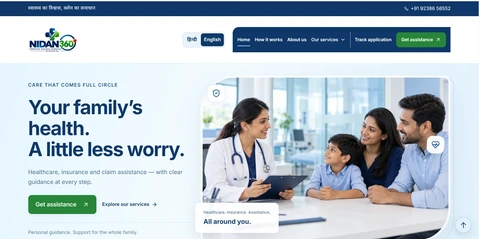
The home page opens with a plain promise, “Your family’s health. A little less worry.”, and one primary action, Get assistance. The navigation covers How it works, About us, Our services and Track application, and a language switch offers Hindi and English.
Services that are easy to choose on a phone
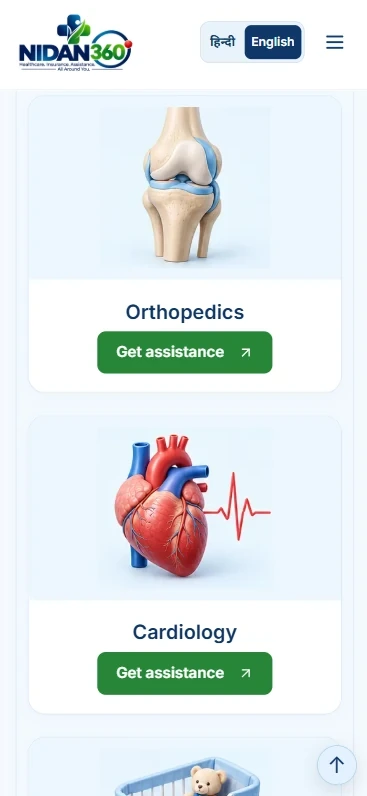
On mobile, each specialty, such as Orthopedics and Cardiology, is its own card with an illustration and a Get assistance button. A visitor can pick a service and start a request without searching through menus.
A workspace that shows every case
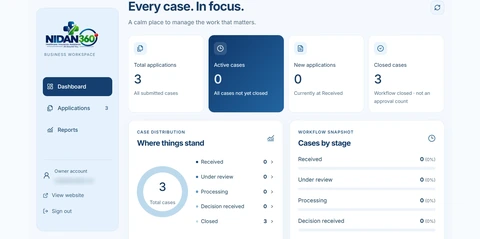
The business workspace opens on a dashboard with total applications, active cases, new applications and closed cases, plus a view of cases by stage: Received, Under review, Processing, Decision received and Closed. Applications and Reports sit in the side menu. The numbers in the supplied screen are a small sample, not performance results.
When a service involves worry and paperwork, make the first step obvious for the visitor and give the team one place to follow every case. Keep language choice and case status visible instead of buried.
Explore the relevant development service for this project workflow to discuss your requirements.